Backend exception groups
The Errors view also groups supported backend exceptions from logs and spans, with samples, versions, assignment and lifecycle. Browser source maps and replay keep their own permissions and retention.
JavaScript errors are captured automatically, fingerprinted into groups and enriched with source-mapped stack traces. When the session was recorded, an error links to its recorded session, so you can investigate what the user experienced. Backend exceptions from your traces and logs join the same list, with what is new, spiking or back after a fix at the top.
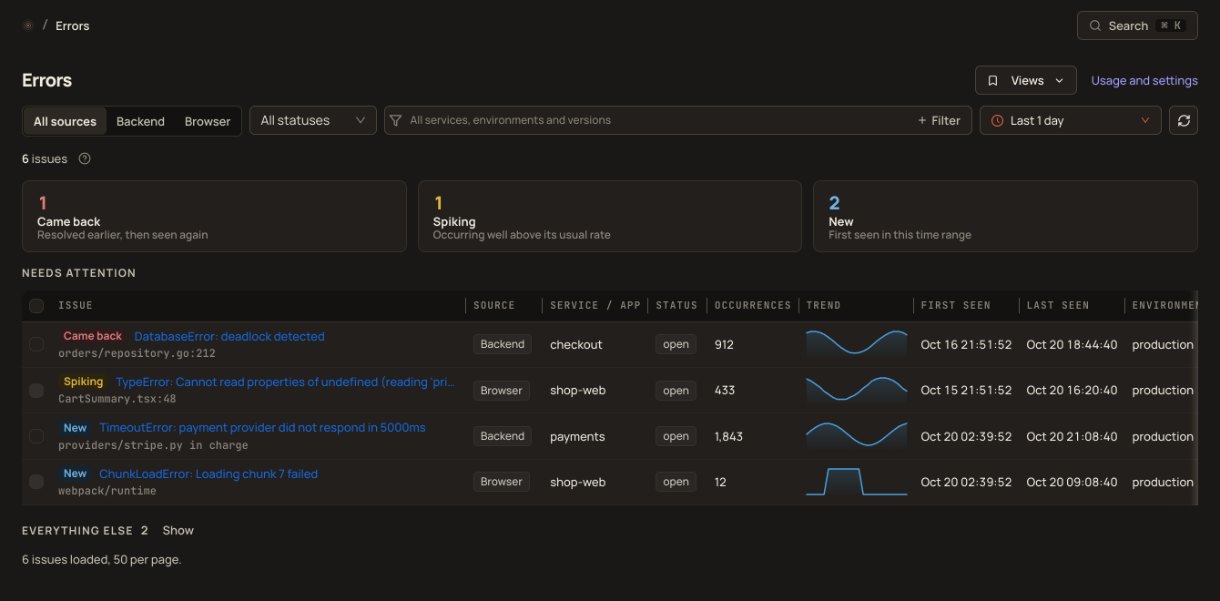
Raw error counts are meaningless. Site Qwality fingerprints errors by message and stack frames, groups duplicates automatically, and surfaces the errors affecting the most sessions, so you always know exactly where to look.
The Errors view also groups supported backend exceptions from logs and spans, with samples, versions, assignment and lifecycle. Browser source maps and replay keep their own permissions and retention.
Configure RUM alert rules for new, regressed and escalating issues, or thresholds, and choose your existing Site Qwality notification channels.
Errors are fingerprinted by message and stack frames, so repeat occurrences of the same bug collapse into one actionable group.
Upload source maps with Debug IDs to recover original files, functions and lines. Opening an occurrence can resolve it even when its map was uploaded later.
Each error group shows its events, the sessions it hit and the identified users behind them, so you can prioritize by real impact.
When replay is available for a captured occurrence, open the linked recorded session from the issue.
Track error volume over time to spot regressions right after a deploy or a surge in traffic.
ResizeObserver loop warnings, opaque "Script error." reports and errors from browser extensions are dropped before they reach your groups or your quota.
Upload matching source maps from CI to recover original modules, functions and lines. Debug IDs connect each error to the exact build output, including maps uploaded after the error.
Inject Debug IDs and upload private source maps with @siteqwality/cli, or use the Vite, webpack, Rollup and esbuild adapters. Deploy the exact injected files. Confirmed maps can also resolve earlier occurrences when you open them.
from an error to its replay, when the session was recorded
capture of unhandled errors when the SDK is collecting
source-map lookup when you open an occurrence
free tier, error tracking included with RUM
No. The Site Qwality RUM script automatically captures unhandled JavaScript exceptions and unhandled Promise rejections, and filters out known browser noise such as ResizeObserver loop warnings and errors from browser extensions. You don't need to wrap your code or call any error-reporting function manually.
Errors are grouped by message and stack frames. Without source maps, one bug can split across browsers or releases.
Use @siteqwality/cli to inject Debug IDs into your build output, then upload and confirm the maps from CI. Vite, webpack, Rollup and esbuild adapters automate these steps. Debug ID matching requires a compatible browser SDK; release and filename matching remains supported. See the source-map guide.
Configure RUM alert rules for new, regressed and escalating issues, or thresholds, and choose your existing Site Qwality notification channels. Configure error alerts.
Yes. Error tracking, grouping and source maps are part of Real User Monitoring on every plan. The free tier includes 1,000 Observe and 100 Analyze sessions a month. Filtered browser noise never counts. See the SDK and billing guide for how Observe, Analyze and Replay usage is counted during the SDK rollout.
Uptime, cron, synthetic, logs, RUM, incidents, and status pages. Free tier on every product.