Home
Pricing
Platform Blog About Contact FAQ Partners
Sign in Start free
Real User Monitoring

See your site through
your users' browsers.

A 5.7 kB script captures Core Web Vitals, JavaScript errors and page views from every real session, then records the per-session detail for the sessions you tell it to keep.

Free tier included No credit card 2-minute setup
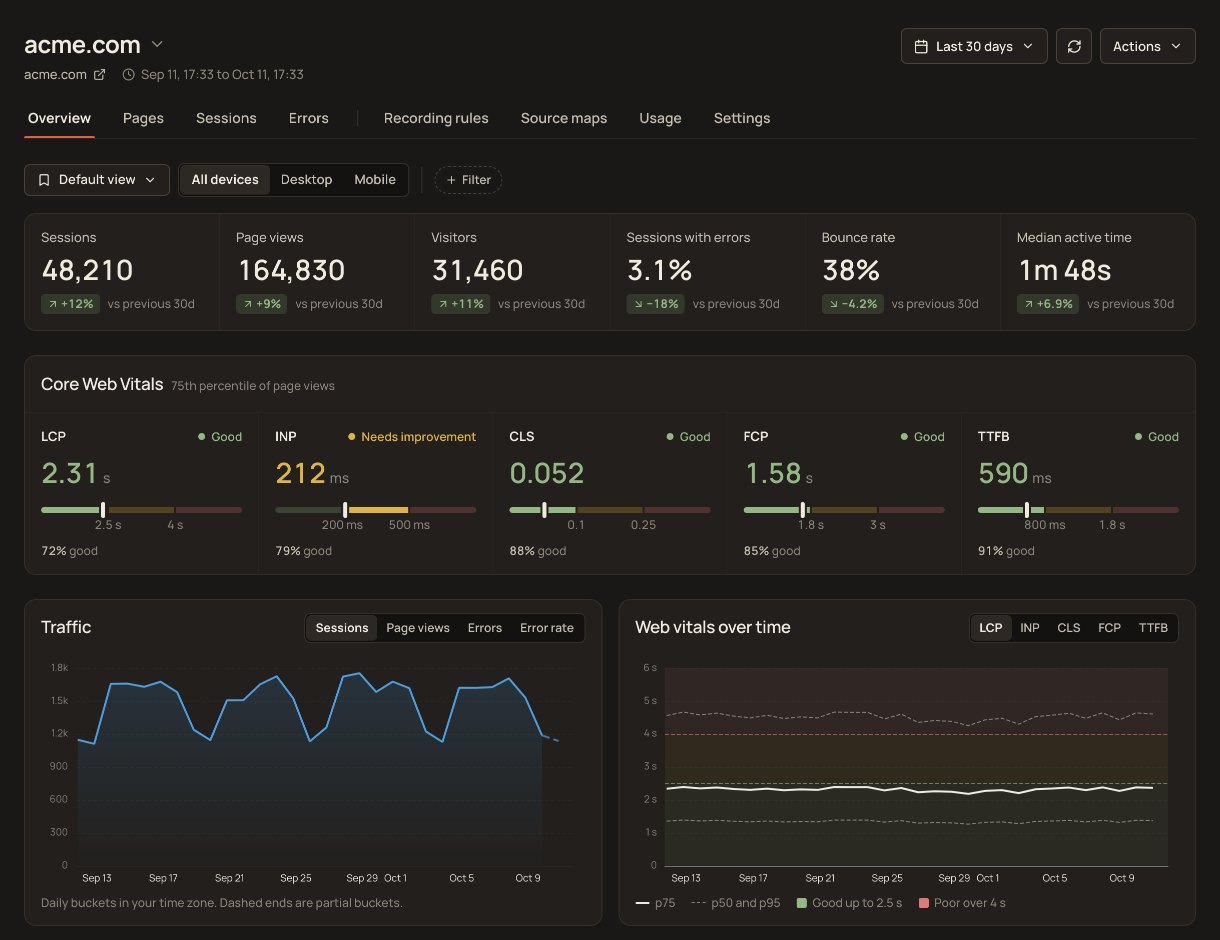
Site Qwality RUM overview with sessions and Core Web Vitals

Every real session in the aggregate. The ones you care about in full.

RUM captures what synthetic tests can't: the actual performance, errors, and behaviour your visitors experience across every device, network, and geography. Two modes let you go from aggregate trends to individual session detail in one click.

Core Web Vitals on every page

LCP, INP, CLS, FCP, and TTFB collected from every page view, with no sampling and no extra configuration required.

Every session measured

Web Vitals, page views and errors are collected from every visitor session, so a low-traffic page or an edge-case flow is never invisible. Per-session detail is captured for the sessions your filters select.

JavaScript error collection

Uncaught exceptions and unhandled promise rejections are captured in-session and linked to the user journey that surfaced them.

Aggregate dashboards (RUM Observe)

Trend Web Vitals at p50, p75 and p95 across any date range, alongside session counts, error rates, top pages and a browser breakdown.

Per-session detail (RUM Analyze)

Drill into individual sessions: full timeline of page views, actions, resources and errors, with the linked session replay in the same panel.

Segmentation on the dimensions we collect

Filter the aggregate views by device type, browser, operating system, or URL, all derived from the request rather than from a tracking cookie, and find a specific person's sessions by the user id or email you pass to setUser.

RUM Observe

Aggregate trends without
the noise.

RUM Observe gives you the big picture: Core Web Vitals per page, p50, p75 and p95 breakdowns, error rates, and session counts trended over time. Filter by device type, browser, operating system or URL to pinpoint who is actually affected, before opening a single session.

  • Core Web Vitals trending across any date range
  • Segment by device type, browser, operating system or URL
  • Top pages, top errors and a browser breakdown on one overview
app.siteqwality.com / rum / vitals
acme.com: Core Web Vitals PassingLIVE
LCP P751.84s
INP P7588ms
CLS P750.04
Desktop78ms
Mobile162ms
Tablet110ms
Safari241ms
Firefox95ms
Lightweight setup

One snippet.
That's the whole install.

Paste one snippet into your <head>. No build step, no webpack plugin, no server changes. The script is 5.7 kB gzipped over the wire, loads as a deferred module so it never blocks rendering, and begins reporting on the next page view. There is an npm package too, if you would rather import it in your entry file.

  • Script is 5.7 kB gzipped over the wire, and does not block rendering
  • CDN tag or npm install @siteqwality/rum, same API either way
  • Call setUser to attach a user id, email or name to the session
install RUM<!-- paste once inside <head> -->
<script type="module"
  src="https://cdn.siteqwality.com/rum/v1/sdk.min.js"></script>
<script type="module">
  SiteQwalityRUM.init({
    applicationId: 'YOUR_APPLICATION_ID',
    clientToken: 'YOUR_CLIENT_TOKEN',
  });
</script>
✓ collecting, first session data received
5.7kB

gzipped over the wire, deferred so it never blocks render

100%

of sessions measured for vitals, page views and errors

5

Core Web Vitals tracked per page view

$0

free tier, no credit card needed to start

FAQ

The script is 5.7 kB gzipped over the wire and loads as a deferred ES module, so it does not block rendering. The session recorder is a separate 22 kB gzipped chunk that is only fetched if a session actually matches a replay capture filter, so most visitors never download it.

Core Web Vitals, page views and JavaScript errors are collected from every session, with no statistical sampling. The heavier per-session detail (individual actions, resource timings, long tasks) and session replay are captured only for the sessions your filters select, which is what keeps the volume, and the privacy exposure, under your control rather than ours.

RUM Observe shows aggregate dashboards: vitals trends, error rates, top pages, and country and browser breakdowns. RUM Analyze lets you open individual sessions and inspect the full per-user timeline, including linked session replays and full error stack traces.

Call SiteQwalityRUM.setUser({ id: 'u_123', email: 'ada@example.com' }) to identify a session, and pass a context object to addError or addAction to attach your own key-value pairs to a single event. Be careful what you put in that context object. It is stored against the event and kept for 30 days on every plan. No dashboard screen or API response renders it today, and you should not treat that as a safeguard: the data is stored, it is readable by anyone with database access, and a future release may surface it in the product. Pass low-cardinality, non-personal labels such as { feature: 'checkout', step: '3' }, and no names, email addresses or order contents.

LCP (Largest Contentful Paint), INP (Interaction to Next Paint), CLS (Cumulative Layout Shift), FCP (First Contentful Paint), and TTFB (Time to First Byte), all measured in real user browsers via the web-vitals library.

Start free. No credit card.

Uptime, cron, synthetic, logs, RUM, incidents, and status pages. Free tier on every product.