LCP, INP and CLS at p75
The three ranking-signal metrics tracked at the 75th percentile, the threshold Google uses to assess whether a URL is "good."
Field data, not lab simulations. Track the three Core Web Vitals Google uses as a ranking signal (per page, at the p75), sourced from your actual visitors via the lightweight Site Qwality RUM script.
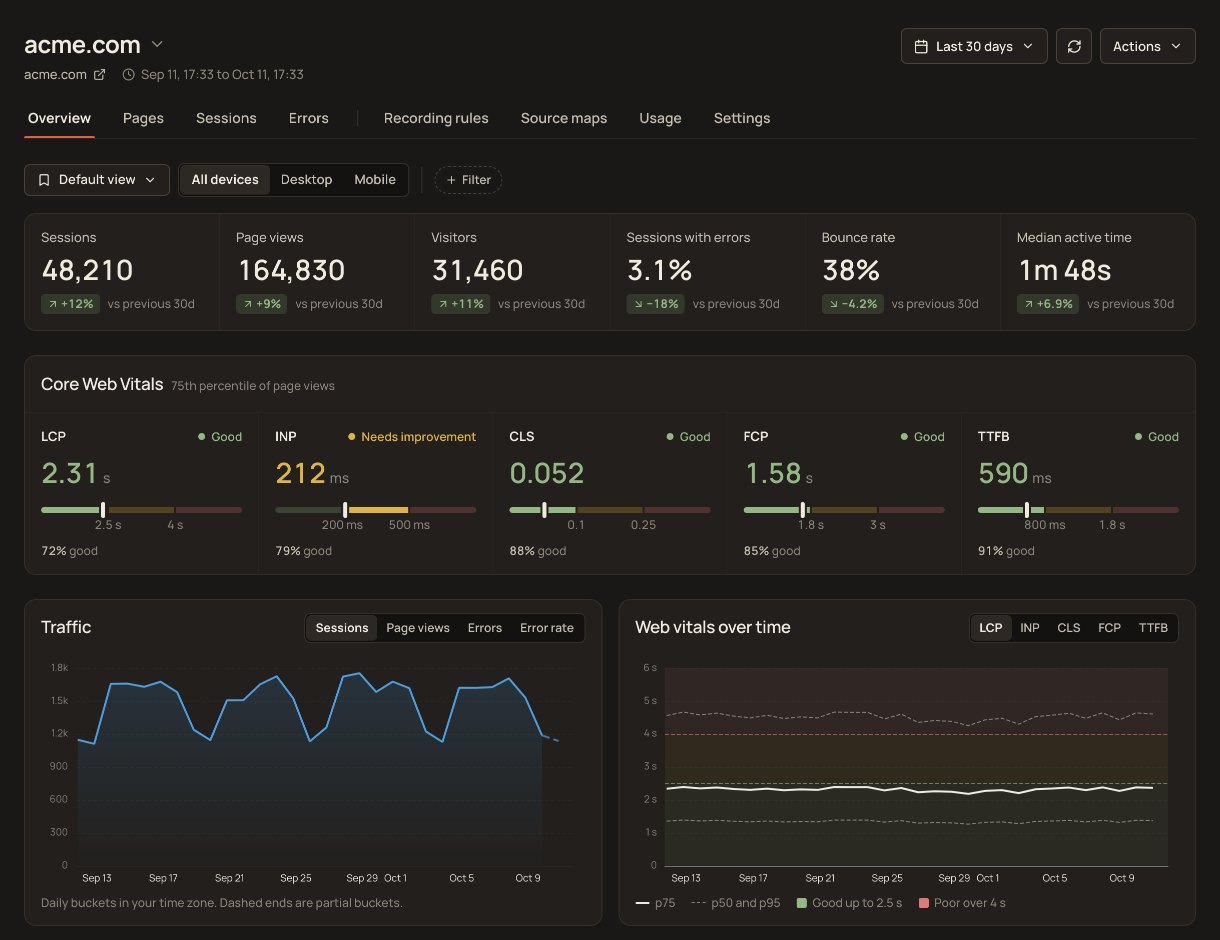
Lighthouse measures a lab condition. Core Web Vitals from real users measures what Google's crawler sees when it evaluates your pages for ranking. Site Qwality collects field data from your visitors, 100% of sessions by default, and surfaces the p50, p75 and p95 over time, with the p75 for every page, so you can act on the numbers that matter.
The three ranking-signal metrics tracked at the 75th percentile, the threshold Google uses to assess whether a URL is "good."
Collected via the Site Qwality RUM snippet from genuine page loads, not a headless browser on a lab network.
See which specific pages have regressed rather than just a site-wide average, with p75 LCP, INP, CLS and load time for each page.
Measurements are stored for 458 days by default, a little over 15 months, on every plan, and you can set a shorter ceiling per application. The overview's time-range selector offers up to 30 days today, so charting a longer window means querying the API directly.
The same chart carries the median, the ranking threshold and the tail, so you can tell a site-wide regression apart from a small group of very slow sessions.
Scheduled Lighthouse and page-speed audits run alongside real-user vitals, so you have both the lab score and the field data for a page. They are two views today, not one combined chart.
A Lighthouse audit runs in controlled conditions: fast connection, powerful machine, empty cache. Your real visitors arrive on a 4G phone from across the world with 20 browser tabs open. Core Web Vitals field data captures their experience, and that is the experience Google ranks.
A site-wide p75 tells you something moved. Top pages shows p75 LCP, INP, CLS and load time for each page in the same window, so you can see which routes carry it. From there, error tracking and session replay tell you what those users hit.
Google ranking-signal vitals tracked at p75
gzipped SDK 2.2.1 core script, loads asynchronously and never blocks render
the exact percentile Google uses in its Page Experience signal
free tier, no credit card needed to start
Lab data (from Lighthouse or synthetic audits) is measured in a controlled environment on a simulated device and connection. Field data is collected from real users on their actual devices and connections. Google's Page Experience ranking signal uses field data, not lab data, which is why tracking real-user vitals matters for SEO.
Google's Core Web Vitals assessment determines a URL's status ("Good," "Needs Improvement," or "Poor") based on the 75th percentile. If your p75 LCP is under 2.5 seconds, 75% of your users see a "Good" load. Tracking p75 aligns your monitoring to what actually affects your ranking.
Paste the snippet into your page's <head>. It queues early calls and errors, loads the SDK asynchronously from the CDN and calls SiteQwalityRUM.init({ applicationId, clientToken }). The SDK 2.2.1 core script is 25.8 KB gzipped and never blocks rendering. Vitals are measured with the browser's native PerformanceObserver API, using the same metric definitions as Google's web-vitals library. No framework required, and there is an npm package if you would rather import it.
Per page. The snippet captures the current URL for every event so you can view LCP, INP and CLS for the homepage, product pages, checkout, and any other route separately.
Yes. Filter the Overview or Pages tab by browser, operating system, device or device class and the vitals follow the selection. The breakdowns also rank devices, browsers and operating systems side by side. Segmenting by connection type is not available: the script does not read the Network Information API.
You can alert on a vital, but there are no deployment markers. A RUM alert rule can watch p75 LCP, INP or CLS over a time window, optionally limited to a route, release or environment, and notify your existing Site Qwality channels. Nothing records a release against the chart, and there is no before-and-after comparison for a specific deploy.
Aggregate measurements are kept for 458 days, a little over 15 months, on every plan including the free tier. Paying more does not extend it and downgrading does not shorten it, so it is the same window for everybody by default. You can ask for less: account admins set a retention ceiling per RUM application in RUM, Settings, Data settings, or through the API (settings.retention.observe_days on PATCH /rum/{app_id}). The floor is one day, and lowering it also removes measurements already stored for that application rather than only applying to new ones. The overview's time-range selector offers up to 30 days, so reading further back means querying the API directly.
Uptime, cron, synthetic, logs, RUM, incidents, and status pages. Free tier on every product.