Compare traffic and errors
Compare sessions, views, visitors and errors with the previous period. Break results down by device, browser, country, channel and release, then open the matching sessions.
Aggregate session counts, error rates, top pages and frustration signals from real user sessions, with a one-click path from any aggregate view into the individual session behind it.
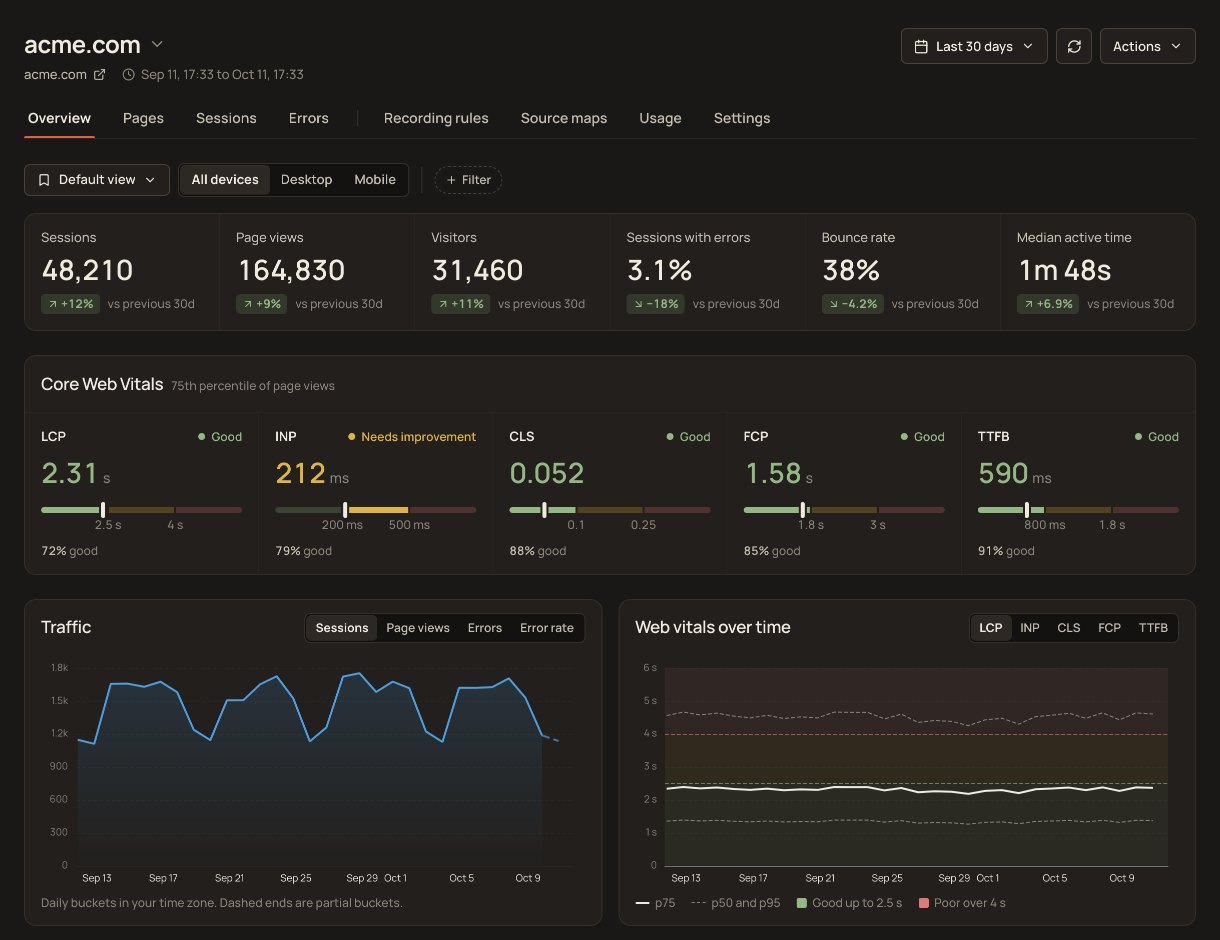
Session analytics turns the RUM stream into an overview you can act on: how many sessions, how many hit an error, which pages they spent their views on, and which of them show signs of a user fighting the interface. From any of those you open the session itself, with its full timeline and its replay.
Compare sessions, views, visitors and errors with the previous period. Break results down by device, browser, country, channel and release, then open the matching sessions.
Rank controls by rage, dead and error clicks. Open the sessions behind an element to inspect what happened.
Compare p75 Web Vitals by route or path, with separate initial-load and route-change timings. Inspect poor-sample elements, recorded script durations and slow resources.
Inspect page views, actions, resource loads, long tasks and errors in order. Open a linked replay when one was recorded and is still retained.
Save the query for Overview, Sessions, Errors or Pages. Keep it private or share it with your account, then return to the same filters.
Comment on a session or error issue, link to an absolute session timestamp and mention teammates. Authors and administrators can resolve or reopen the discussion.
The session list is filterable down to exactly the sessions worth watching: the ones that threw an error, the ones where someone rage-clicked, the ones that have a replay to watch. Each row opens the full session timeline, and from there the recording.
Session analytics is built from the same RUM event stream that powers Core Web Vitals and error tracking. No separate analytics script, no second pageview call. Page views and navigations are recorded automatically; the only calls you ever have to write are the optional ones that attach your own context.
setUser to identify a session, addAction to record your own eventextra scripts: analytics rides the RUM tag
of sessions counted by default, with Observe sampling adjustable per application
per-session detail retention, on every plan
free tier, no credit card required to start
No. Session analytics is built from the same event stream as RUM. If the Site Qwality RUM script is already on your site, session analytics is already collecting. No additional script or configuration is required.
Session analytics surfaces aggregate patterns (session counts, error rates, top pages, frustration signals) across all sessions. Session replay lets you watch an individual session as a video-like recording. Both are powered by the same RUM data, and you can jump from an aggregate view into a specific session replay in one click.
SDK 2.2.1 records scroll depth and time spent on a page. The session API returns those measurements, and page-view details show Time on page; there is no dedicated scroll-depth report. The dashboard also reports median active time. A conversion-funnel builder and a return-rate metric are not available.
setUser attaches identity to a session, and Sessions can search by the user ID or email you provide. Recorded custom attributes are returned by the session API and shown in the Context panel or event details. Context passed to addError or addAction is available on the corresponding recorded event. Filter Sessions and analytics by recorded custom attributes using attr.<key>; arbitrary grouping by custom attributes is not supported. Send non-personal labels rather than sensitive data.
Observe measures default to 458 days, a little over 15 months; Analyze details and session replays default to 30 days. Account admins can shorten all three per application in RUM Settings → Data settings or through the API. Observe and Analyze accept positive whole-day ceilings; Replay accepts 7, 14 or 30 days. Each ceiling is capped by the account entitlement. Shortening a ceiling also schedules permanent cleanup of existing data, including recordings and indexes. Cleanup is asynchronous, and removing a ceiling cannot restore erased data. See Data Retention for the storage lifecycle and exclusions.
Uptime, cron, synthetic, logs, RUM, incidents, and status pages. Free tier on every product.